2.4 Understanding iWay Variables (Special Registers)

Variables in iWay are also known as Special Registers (SREGs). SREGs allow users or the system to store values as variables and refer to them throughout message processing, component configuration, or when used on the server level. These variables can be accessed using the standard iWay Functional Language (iFL) function called _SREG(). For more information on this function or any iFL function, see the iWay Functional Language Reference Guide.

SREGs are created and presented to an application as required. In addition to the SREGs established to describe iWay Service Manager (iSM) settings, each listener in a channel inlet sets SREGs that are specific to the protocol being used. For example, the File listener creates _SREG(filename) to show the name of the file being processed.

Individual services (or nodes) in a process flow can also create SREGs that are applicable for that service.

SREGs and their values can be seen at any point in a process flow by using the Variables object, which is available under the Components group of the object palette in iWay Integration Tools (iIT), as shown in the following image.

Variables Object

This section includes the following topics:


2.3 Understanding Transaction Management

iWay Service Manager (iSM) manages transactions to ensure that multiple actions either all complete or none complete. This is standard transaction management for servers. iSM uses concentric transaction control, addressing the different requirements for a listener or a process flow. Naturally, actual transaction control is influenced by the protocol and external resources themselves, and so, this general discussion must always be considered in light of the environment.

Listener transactions (attempt to) ensure that messages are processed one time only, but are not lost. To this end, messages are read under transaction control. Completion of processing of the message, regardless of outcome, completes the transaction and the message is deleted from the source. For example, the message is picked from an MQ queue and then deleted at the end. On the other hand, if the server should fail during mid-processing, then the transaction does not complete and the message is made available by the original source for re-execution.

Once read, the message is processed by the channel itself. This includes the process flow. During the execution, specific services, such as SQL, can associate themselves with the transaction and receive notifications in a two-phase commit manner as the process flow ends.

The process flow itself can end in one of three ways:

  • Successfully. Any associated services receive a successful notification and can commit their work with any external resources with which they are associated.
  • General Failure. The associated services receive notification and perform a rollback as required.
  • Fail Service Execution. A Fail object can be included in the process flow to signal a failure, which is handled as a general failure, but under program control.

Note that the use of a Catch object in a process flow provides error handling, and thus the outstanding failure is ignored. The process flow can use a Fail object to terminate the flow from within the catch handling if desired.

There is also a Retry object available, which for supporting protocols causes the original message to be resubmitted following a configured delay. This can be continued until the message succeeds or a configured retry limit is reached. If the retry limit is reached, then the message is considered to be permanently failed. However, this can be reset by configuring a failure event flow.

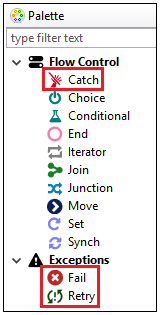
The Retry and the Fail objects are available in the process flow palette under the Exceptions section as shown in the following image. The Catch object is available under Flow Control section.

Best Practices

The flexibility of iSM threading models enables the server to be tailored to a wide variety of application requirements. While no set of suggestions or recommendations are valid for all applications, some overlapping guidelines, as listed below, can be considered as best practices:

Sometimes using a fewer number of threads provides better performance than using many threads. For example, applications configured using only a few threads when reading from an IBM WebSphere MQ queue have been clocked as completing work faster than when the listener is configured with many threads.

  1. Determine your performance goals before you begin configuring an application. What constitutes success? For example, placing an emphasis on faster processing for its own sake consumes resources that might be better spent elsewhere.
  2. Use a minimum number threads as possible to maintain pace with the application requirements.
  3. Try to keep the number of worker threads in active use to a small multiple of the number of available processors.
  4. Process flows with long wait times built in, such as those that address external systems over communications lines, will need more threads than those that simply work in memory performing tasks such as transformations.
  5. Do not be afraid to try various configurations and measure as you proceed. Remember that threads are not the only resource that impacts performance. Consider memory availability and other processes running on the system. When measuring, remember that Java optimizes code after many transactions are run through the server (iSM). Do not start to measure until you have run at least 1000 transactions.

How to Obtain Thread Information

When operating iSM in a command prompt window or Telnet console, many commands are available to assist in understanding (and possibly debugging) the current state of iSM. One of the more useful commands is threads, as shown in the following image.

For more information on iSM commands, see the iWay Service Manager Command Reference Guide.

Ordered Listener

A specialized form of the internal listener is the ordered listener. This is a patented facility that automatically sorts and relates messages to ensure that the messages are presented to the listener in a desired order (time, lexical or numeric compare, or application-specific). In addition, an ordered listener ensures that the messages in any ordered group are processed sequentially while also processing multiple groups in parallel. This facility simplifies the development of applications that require identified processing orders.

Internal Listener and Its Impact on the Threading Model

The internal listener is an iSM-managed queuing protocol that accepts messages from other channels for asynchronous execution. The primary responsibilities of the internal listener are:

  • Provide an opportunity to change from one threading model to another.
  • Alleviate stress on another channel by executing work independently of the response to the sender.
  • Break up (modularize) the application for simpler development and maintenance.

When the Internal Emit service (com.ibi.agents.XDInternalEmitAgent) is used in a process flow, the message is immediately added to a named internal listener queue.

When the Internal Emit service sends the message to the internal queue, it immediately completes, passing the document out for any further processing. A common use of the internal listener is to have the first channel perform required preliminary processing and then immediately send a receipt message, or Message Delivery Notification (MDN), while the actual business processing proceeds without reference to the actual source. In the AS2 protocol, the logic in the internal listener channel could prepare an asynchronous notification of the result of the business processing. The recipient would need to correlate a result received asynchronously with the original message. Because the internal listener channel displays the original transaction ID, the asynchronous message can contain the required information to assist in the correlation.

The following diagram illustrates the link between two channels. The inlet and outlet handling is shown as purple boxes. The process flow in the first (top) channel sends the message to the internal listener channel (shown on the bottom), and then immediately proceeds to complete operation of the first stage.

The internal listener channel can operate on a different number of threads than the original recipient of the message. For example, it may be necessary to receive messages on a single thread to preserve input message number tracking. However, once the message is determined to be in the correct sequence, the actual execution can proceed on multiple threads.

Alternatively, it may be required to receive on a large number of threads, but for a final stage of execution, only one thread might be possible. This type of requirement can occur because of restrictions on a resource (for example, a fixed number of connections to an online system, such as SAP) or the need to control output sequence numbering in some manner.

The internal listener provides the following types of application flow throttling control:

  • Passivation

    Passivation refers to sending instructions to other listeners (channels) to cease acquiring messages from their own input sources. The internal listener does this by allowing the configuration of a high and low mark.

    When the number of messages on the internal listeners queue exceeds the high mark, the passivation is sent to the identified channels. The internal listener continues to acquire messages from its queue, and when the number in the queue reaches the low mark, the identified channels are reactivated. Channels that are not passivated can continue to acquire messages for their processing and add messages to the internal queue.

  • Inhibition

    Inhibition can be configured for a channel, which causes the internal queue to reject attempts to add to the queue while the number of messages on the queue exceeds the high mark. The inhibition state is reset when the queue reaches the low mark. The process flows attempting to add to the inhibited queue enter a pause state, and the add attempt may time out. In such a timeout case, a status document is passed down the timeout edge of the feeding process flow, if available. The use of inhibition can have a cascading impact on the application, causing a general pause in processing while the internal channel catches up with the required work.

The internal channel also supports message priority. Usually, a message is placed on a queue at a middle priority. Using priorities allows the sender to reorder message execution through the channels as required. As a best practice, iWay recommends using priorities only if required. Use priorities one value up or down from the original value. Avoid using the highest priority value (9). Priorities are relative to other messages, and higher numbers do not necessarily result in faster processing.

Maximum Listener Thread Settings

There are other listeners that cannot wait for any period of time (for example, TCP or HTTP). The listener must accept the message and pass it to a worker for execution, otherwise the message gets lost.

If there are no workers available to handle the message, you can convert (assign) many of the listeners into queue listeners by writing the message onto an internal queue and then responding to the sender with an "I got it" message. For example, this technique is used (although not with the internal listener) for the AS2 protocol, where a listener takes the message, returns a Message Delivery Notification (MDN), and then proceeds to handle the message. This way, the time for a worker to become available is minimized.

You may want to increase the number of workers running in parallel to handle the actual traffic. For example, in HTTP you might usually expect five simultaneous messages (five workers), but once in a while you may require ten workers. To do this, set the Multithreading parameter to 5 and the Maximum Threads parameter to 10. When the sixth message arrives, the worker pool notices that there are no workers available and creates a sixth worker to acquire the message. This way, the message is not lost. If the sixth worker finishes, it goes back into the worker pool, which now has a total of six workers.

However, because each worker uses resources, the system monitors the pool. After some time has passed, it destroys the sixth worker, since all you require is five. The extra worker was only used to handle the peak situation.

Some listeners do not offer the ability to grow threads, and some do.

You cannot set the Maximum Threads parameter to a value that is less than the value for the Multithreading parameter. The multithreading count is the number of waiting workers. These workers are pre-started to avoid startup time when messages arrive, so the size of the pool is the multithread count. Do not confuse this with Operating System threads. It is not guaranteed that they map one to one, although in most Java Virtual Machines (JVMs) they do.

How Channels Use Threads

An inlet is the component of a channel that accepts and prepares messages for execution. In an inlet, the portion that accepts and prepares messages for execution is called a listener. Listeners implement the specific protocol that is required to obtain the message. The listener is also the component that is responsible for thread configuration.

Each listener executes in its own thread and never shares resources with other listeners. iSM starts and stops listeners, and gathers and distributes statistics on their operation. Listeners are designed to be reasonably inactive. They mostly await events and prepare them for execution. The execution is delegated to a worker thread, which in iSM is called a worker. When you set the thread count for a listener, you are declaring how many workers that listener has available to accept and process work. A message is only bound to a worker during its execution, from when it is ready to be processed until the processing is complete. The completion of a process is not meant in a business sense, rather the handling on the message until the current operation is completed.

Because workers take time to start up and shut down, iSM allocates a pre-initialized set of workers to each listener, called the listener's worker pool. The Multithreading configuration parameter on the listener configuration instructs iSM startup on how many workers are to be allocated to the pool. This parameter is available for all listeners. When a message arrives, the listener selects a worker from the pool, assigns the message to it, and then moves on to await the arrival of the next message.

The consequence of the multithreading value varies among protocols. Protocols that manage queues, such as any of the queue listeners (for example, MQ or internal), accept a message and request a worker for its execution. The listener waits until a worker is available and then hands off the work. If the number of workers is less than the number of messages in a queue, the messages wait in the queue until a worker is available for their execution. Given an expected arrival distribution and estimated time of service for a message, you can calculate how long a message will wait.

2.2 Understanding Thread Management

iWay Service Manager (iSM) is engineered as a modern, multi-threaded server. It accepts messages on threaded inlets and processes many messages in parallel. Computers use threads as a means of allocating computational resources. Operating systems take responsibility for allocating those resources among threads. Although different operating systems may implement the heuristics of thread/resource allocation in different ways, the general purpose is to get as much work as possible through the application in a given period of time. The usual heuristic is to allow one thread execute while another thread is waiting the completion of a slower task, such as awaiting user input or the completion of an I/O event.

iSM is designed to maximize the work able to be performed on arriving messages to provide high throughput, or the number of messages that can be processed in a given period of time. Messages are isolated from each other during their processing, ensuring that inadvertent interaction does not occur and that the failure of one message does not accidentally impact other messages.

In multiprocessor hardware, the threads are executed by separate CPUs, and the ability of the application to take advantage of multiple CPUs is referred to as scalability. iSM works to avoid the interlocks that reduce scalability in order to take maximum advantage of the resources available to its execution.

In iSM, some thread management is automatic. For example, the use of threads to watch for runaway process flows or to respond to console requests. These threads have minimal impact on the actual message execution and are not considered further in this section.

The configuration of listeners by users impacts the use of threads in iSM.

This section includes the following topics:


Message Processing

In general, a message entering the server (iSM) has three main parts, as shown in the following diagram.

This diagram shows the message stack organized with the more physical layers of the message at the bottom and the more abstract (business-oriented) layers of the message at the top.

  • Payload. Regardless of the transport protocol on which the message arrives, the payload is the data representing the content of the message. The payload can be in native (flat), XML, or JSON format. Examples includes EDI and SOAP messages, or an API request. The channel can be configured to parse the incoming payload into an internal format, leave the incoming payload in its current format (no parsing), or use preconfigured or customized preparsers to convert a unique payload format into an internal format.
  • Headers. Message headers contain contextual information about the payload or protocol interactions, such as encoding information, content type, and so on. In a HTTP transport, these are the HTTP headers. In a MQ transport, these are part of the Message Queuing Message Descriptor (MQMD). Regardless of the transport, the headers are made available to the application in a common manner.
  • Transport. This is the transmission method by which the message reaches (or is emitted by) iSM. iSM supports a wide variety of transport protocols, such as HTTP(S), many queuing mechanisms (MQ, JMS, Rabbit, etc.), FTP, files, and so on.

An iWay adapter handles all three layers of the message. iSM makes it easy to configure each of these independently. The following diagram shows how these layers map to corresponding functions in iSM.

Conceptually, an inbound message moves up the stack from its physical protocol to where its logic and semantics are handled, and then back down the stack to be emitted. This may occur using a single type of protocol adapter or with the inbound and outbound sides using different protocols.

The transport is handled by a listener (for incoming messages where iSM is acting as a server) and an emitter (for outgoing messages where iSM is acting as a client). Note that iSM frequently behaves as a client and a server within a given installation. In almost all cases, the transport components provided by iSM will be sufficient to construct your channels, since iSM supports all industry standard protocols.

The headers are handled by dispatching and routing. This is the middleware level where much of the added value of iSM resides and where the iWay preparser exits are executed.

Finally, the message is handled by the application level. This is where iWay process flows are executed, and the level where integration applications are written.

The following diagram illustrates the flow of a message or document through a simplified, single-directional channel.

The phases of working with a message or document can be subdivided further. Various exits are provided for dispatching and routing, which can be configured for your application. The following diagram illustrates a message flow where all of the available exits are shown.

After a message is received, the first step can be to verify the security of the message. This ensures that the sender is authorized, confirms that the message was not changed, and decrypts parts of the message that were encrypted. iSM provides security exits for many common security algorithms, including W3C Digital Signature, Pretty Good Privacy (PGP), among others. From the exit, you can also check credentials using an external security manager, such as Netegrity, Active Directory, or an LDAP server.

Before their payloads can be handled, all messages must frequently be parsed into an internal format. iSM can automatically parse XML and JSON payloads to an internal format. However, process flows can also handle flat documents as well. The dispatching step is called for non-parsed messages to encode their contents as required by the application. This is called a preparser because it occurs before the message is parsed from its unknown format into the appropriate internal format. On the outbound side, the corresponding step is called a preemitter, which can encode an internal format such as an XML tree or a JSON object into a format required by the message recipient. iSM supports many non-standard XML or JSON formats for preparsing and preemitting, thereby eliminating the requirement to code a specific exit.

Finally, there is an exit to validate the contents of the payload.